How to tile multiple trapezoids in a rectangle?
Moderator: andrew
Forum rules
Always indicate your operating system and QCAD version.
Attach drawing files and screenshots.
Post one question per topic.
Always indicate your operating system and QCAD version.
Attach drawing files and screenshots.
Post one question per topic.
-
ChrisCAD
- Junior Member
- Posts: 14
- Joined: Sat Feb 17, 2024 6:34 pm
How to tile multiple trapezoids in a rectangle?
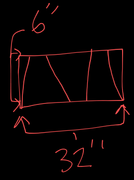
The goal is a perfectly continuous fill, where the trapezoids align edge to edge and fully occupy the rectangular boundary with no gaps or overlaps inside a rectangle of fixed length and height. I have a 32"x6" piece of sheet metal bar that I need to draw 3 trapezoids the exact same size from corner to corner of the metal sheet. How do I do this?
-
CVH
- Premier Member
- Posts: 5145
- Joined: Wed Sep 27, 2017 4:17 pm
Re: How to tile multiple trapezoids in a rectangle?
Hi,
There are some constrains missing to complete the answer.
First: You probably refer to isosceles trapezoids (trapeziums) ...
... Otherwise you must at least specify some details about the trapezoids.
Then for 3 identical isosceles trapezoids:
As on your draft the bottom edge of 32" long is equal to: 2x the longer edge (base A) and 1x the shorter edge (base B).
The top 32" edge is equal to: 1x the longer edge, 2x the shorter edge and 2 remaining parts.
The remaining parts are triangles and the edge (C) of interest is (base A - base B)/2 long.
Meaning that:
Bottom 32" = 2x A + 1x B
Top 32" = 1x A + 2x B + 2x (A - B)/2 and simplified that is also equal to 2x A + 1x B
 Any combination that fits the 2x A + 1x B = 32" relation is a solution.
For example: 13" and 6" or 12" and 8" or 15" and 2" ... And so on (10" 2/3 < A < 16")
You need to specify an extra constrain.
For example: B = A / 2
Then the result becomes fixed: 32" = 2.5x A => A = 12.8", B = 6.4"
What remains (C) is (12.8 - 6.4)/2 long or 3.2" at both sides.
The acute angles of this isosceles trapezoid are 61.927513.. degrees = atan(6.0 / 3.2)
Another constrain could be: Acute angle = 45 degrees. (36.869898.. < angle < 90)
Then B = A minus 2 times 6". (tan(45) = 1.0 => C = 6.0")
=> 32" = 2x A + (A - 12") or A = 14.666...", B = 2.666..."
It is a bit more complicated when you specify the isosceles trapezoids equal legs length. (e.g this topic)
For example 7.5" long legs. (6" < leg < 10")
Then C is sqrt(7.5² - 6²) long = 4.5"
A is then equal to B + 9"
=> 32" = 3x B + 18" or B = 4.666...", A = 13.666..."
The acute angles of this isosceles trapezoid are 53.130102.. degrees = acos(4.5 / 7.5)
The Math can be expanded to more than 3 identical isosceles trapezoids.
And further expanded for: Acute, Right, Obtuse or 3 equal sided trapezoids.
 Note that this doesn't account for 2 parallel offsets for the cutting width.
Including that is much more complicated.
Regards,
CVH
There are some constrains missing to complete the answer.
First: You probably refer to isosceles trapezoids (trapeziums) ...
... Otherwise you must at least specify some details about the trapezoids.
Then for 3 identical isosceles trapezoids:
As on your draft the bottom edge of 32" long is equal to: 2x the longer edge (base A) and 1x the shorter edge (base B).
The top 32" edge is equal to: 1x the longer edge, 2x the shorter edge and 2 remaining parts.
The remaining parts are triangles and the edge (C) of interest is (base A - base B)/2 long.
Meaning that:
Bottom 32" = 2x A + 1x B
Top 32" = 1x A + 2x B + 2x (A - B)/2 and simplified that is also equal to 2x A + 1x B
Any combination that fits the 2x A + 1x B = 32" relation is a solution. For example: 13" and 6" or 12" and 8" or 15" and 2" ... And so on (10" 2/3 < A < 16")
You need to specify an extra constrain.For example: B = A / 2
Then the result becomes fixed: 32" = 2.5x A => A = 12.8", B = 6.4"
What remains (C) is (12.8 - 6.4)/2 long or 3.2" at both sides.
The acute angles of this isosceles trapezoid are 61.927513.. degrees = atan(6.0 / 3.2)
Another constrain could be: Acute angle = 45 degrees. (36.869898.. < angle < 90)
Then B = A minus 2 times 6". (tan(45) = 1.0 => C = 6.0")
=> 32" = 2x A + (A - 12") or A = 14.666...", B = 2.666..."
It is a bit more complicated when you specify the isosceles trapezoids equal legs length. (e.g this topic)
For example 7.5" long legs. (6" < leg < 10")
Then C is sqrt(7.5² - 6²) long = 4.5"
A is then equal to B + 9"
=> 32" = 3x B + 18" or B = 4.666...", A = 13.666..."
The acute angles of this isosceles trapezoid are 53.130102.. degrees = acos(4.5 / 7.5)
The Math can be expanded to more than 3 identical isosceles trapezoids.
And further expanded for: Acute, Right, Obtuse or 3 equal sided trapezoids.
Note that this doesn't account for 2 parallel offsets for the cutting width.Including that is much more complicated.
Regards,
CVH
-
ChrisCAD
- Junior Member
- Posts: 14
- Joined: Sat Feb 17, 2024 6:34 pm
Re: How to tile multiple trapezoids in a rectangle?
Thank you. I figured it out.